

Vizrt announced its new TriCaster lineup on September 10, 2026. Alongside the 2RU TriCaster Prizm and Vizion systems came two capabilities: Vizion AI/R, a subscription add-on for TriCaster Vizion, and LivePanel Pro, which comes with Prizm and Vizion.
Vizion AI/R
AI/R pairs a real-time AI keyer with augmented-reality graphics inside the switcher. The keyer does not depend on an evenly lit green screen, so a presenter can be keyed into a virtual set from an ordinary room. Vizrt built it so that virtual sets and AR graphics do not need a separate virtual studio build or a specialist operator, and it aims AI/R at corporate, campus sports, campus media and worship productions.
It is an annual subscription for TriCaster Vizion only; it is not offered for Prizm or Mini. We can quote and order it now. Ask us for the current delivery date.
LivePanel Pro
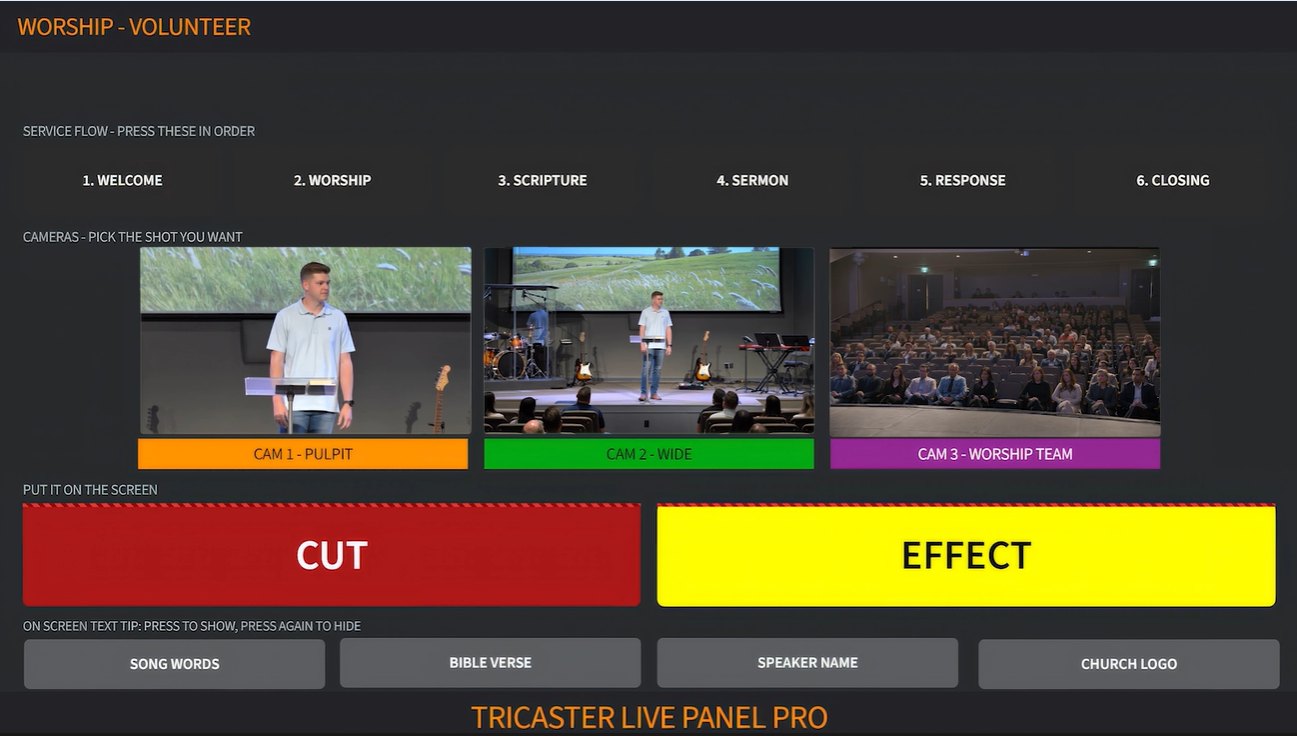
LivePanel Pro is a browser-based control layer. Each operator gets a layout for the tasks they own (cameras, graphics, audio or streaming) on any screen on the network, with a widget designer, video previews and role-based access.
That suits crews who share the work across screens, such as volunteers running a worship service. It is included with TriCaster Prizm and Vizion, not a separate purchase, and it is not offered on TriCaster Mini.
See TriCaster Vizion and Prizm
Ask about a demonstration: we schedule by appointment at our East Rutherford facility and will tell you which systems are available to see. For the full lineup and prices, see Vizrt TriCaster at Varto.
Related: Vizrt TriCaster · Vizrt · Events